
How to install plugins emoticons on the tinymce editor
- Administrator
- Editor tinymce, Plugin, Emoticons
- 3408 Times Viewed
- 0 Comment

How to install plugins emoticons on the tinymce editor
The presence of plugins emoticons on a blog or website is actually not very important, because only as a pleasure only. However sometimes we also have the desire to add emoticons on what we write, with the purpose to show or describe what we're feeling.
And here is how to install plugins emoticons on the tinymce editor, so you can add emoticons on the article that you are making.
Please open the root_directory/po-admin/admin. php, copy the code below and paste it on the part of the caller js:
<script type="text/javascript" src="../<?=DIR_INC;?>/js/tinymce/plugin/emoticons/plugin.min.js"></script>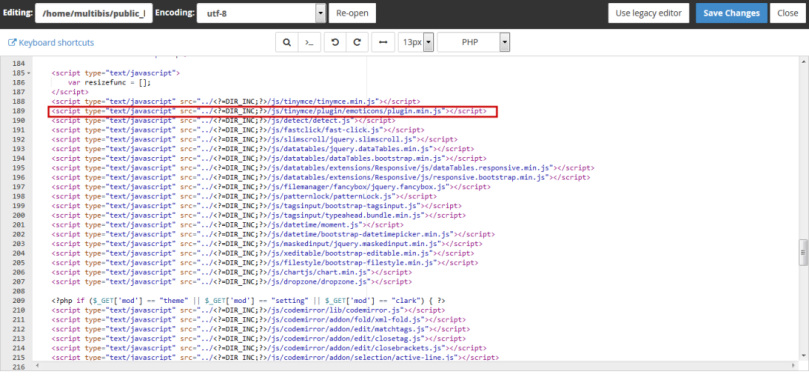
Images 1.1 Instal plugin.min.js
Then please scroll to the bottom, in the javascript editor tinymce. On the lines of toolbar1 or toolbar2 please add "emoticons", so too did the same thing on the tinymce editor to the javascript 2.
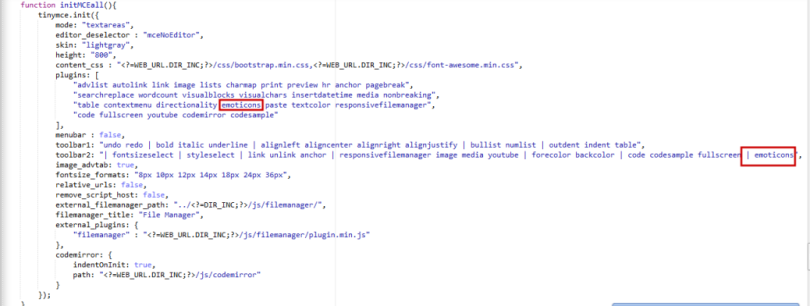
Images 1.2 How to Instal Emoticons
Now please save the changes, then please login as admin and open the tinymce editor. If you have successfully then it will look like in the image below, to use the emoticons you just click.
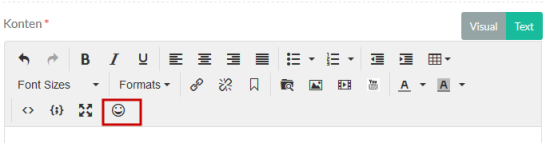
Images 1.3 Plugin Emoticon

Adding of the Rel List on Link Tinymce Editor Plugin
Adding of the Rails List on Link Tinymce Editor Plugin For the bloggers link is one of the absolute Onpage SEO methods and must be applied in...

Add to the List the title and caption on Image Tinymce Editor plugin
Add to the List the title and caption on Image Tinymce Editor plugin In an article or tutorial images is a content which is often used to clarify a...

Administrator
13 Januari 2018Hey..... Apa kabar? Semua artikel dan layanan yang kami sediakan di sini semata-mata untuk kepentingan pengguna dan klien. Jadi jika Anda merasa membutuhkan pelayanan kami silahkan jangan ragu untuk menghubungi. Kami juga bersedia untuk melayani konsultasi online melalui media sosial, melalui komentar dan melalui halaman testimonial yang telah kami sediakan. Selain itu Anda juga dapat menggunakan kontak form yang tersedia.
Jika apa yang anda dapatkan dari situs ini bermanfaat, silahkan dukung dengan like dan share . Terimakasih telah berkunjung, silahkan kembali kapanpun anda merasa membutuhkan layanan yang kami sediakan.
Status Akun Iklan 11 Juni 2024
Saya sampaikan bahwa status akun iklan sudah saya cek dan saya kelola. Sehingga pagi ini siap untuk di jalankan.
Abaikan notifikasi/tanda yang ada; Dibatasi anggaran, merah, kuning, apapun itu mohon di abaikan. Saya sudah pertimbangkan dan sesuaikan di masing-masing akun. Pagi ini, pukul 04.45 WIB saya baru selesai periksa dan setting semua akun. Sehingga tidak ada lagi yang perlu di tanyakan. Silahkan jalankan iklan.
Terimakasih
JOPanda
